Other
2017-11-25 release
2021-03-09 update
Environment setting procedure
| process order | link destination |
|---|---|
| XAMPP | See Other | XAMPP installation (decompress), usage |
| Apache | See Preparation | Document Root localhost, mini-blog.localhost |
| Domain | See Preparation | hosts Domain localhost, mini-blog.localhost |
| Sample code | See Other | Sample code |
| MySQL |
XAMPP Control Panel start See Preparation | Database create Database, create table SQL, restore table SQL |
| Operation Check (Mini Blog Application) |
XAMPP Control Panel reboot See Preparation Operation Check |
| Xdebug NetBeans |
See Other | Xdebug php.ini add (last line) See Other | NetBeans Project etc |
| Operation Check (IDE debug function) |
XAMPP Control Panel reboot See NetBeans Debugging methods | Debugging Session |
XAMPP
| download | XAMPP Windows |
| installation destination |
e.g. C:\XAMPP\xampp_5.6.31 (any folder) decompress xampp-win32-5.6.31-0-VC11.zip (in C:\XAMPP) rename C:\XAMPP\xampp → C:\XAMPP\xampp_5.6.31 (C:\XAMPP XAMPP Multiple versions are possible) xampp-win32-5.6.31-0-VC11-installer.exe is not used (To use XAMPP Multiple versions) |
| config file |
execute setup_xampp.bat (path information in config file is modified) config file (httpd.conf, my.ini, php.ini etc) execute once only after decompress |
C:\XAMPP\xampp_5.6.31\setup_xampp.bat
| start program |
C:\XAMPP\xampp_5.6.31\xampp-control.exe (shortcut) XAMPP Control Panel When you run only first time, select Language (English) |
| Autostart of modules |
Apache, MySQL (Config button)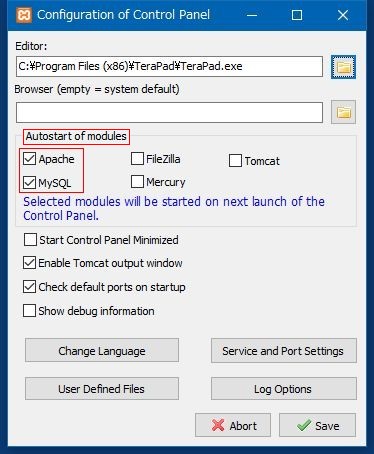
|
Sample code
| download |
https://github.com/beginner001-etc/php-framework-for-learning (php-framework-for-learning-master.zip) |
|
decompress it in C:\XAMPP\xampp_5.6.31\htdocs after decompress rename php-framework-for-learning-master → mini-blog.localhost |
C:\XAMPP\xampp_5.6.31\htdocs\mini-blog.localhost
Xdebug
|
[XDebug] zend_extension = "C:\XAMPP\xampp_5.6.31\php\ext\php_xdebug.dll" ;xdebug.remote_autostart=on xdebug.remote_enable=on xdebug.remote_handler=dbgp xdebug.remote_host=127.0.0.1 xdebug.remote_port=9000 xdebug.remote_mode=req ;xdebug.idekey="netbeans-xdebug" xdebug.profiler_enable = 0 xdebug.profiler_enable_trigger = 1 |
C:\XAMPP\xampp_5.6.31\php\php.ini
NetBeans
| download | NetBeans IDE 8.2 download (PHP) |
| installation |
netbeans-8.2-php-windows-x86.exe or netbeans-8.2-php-windows-x64.exe |
| Debugging | Debugging PHP Source Code in the NetBeans IDE | Working with the Toolbar and Editor |
| concrete Debugging | Debugging methods |
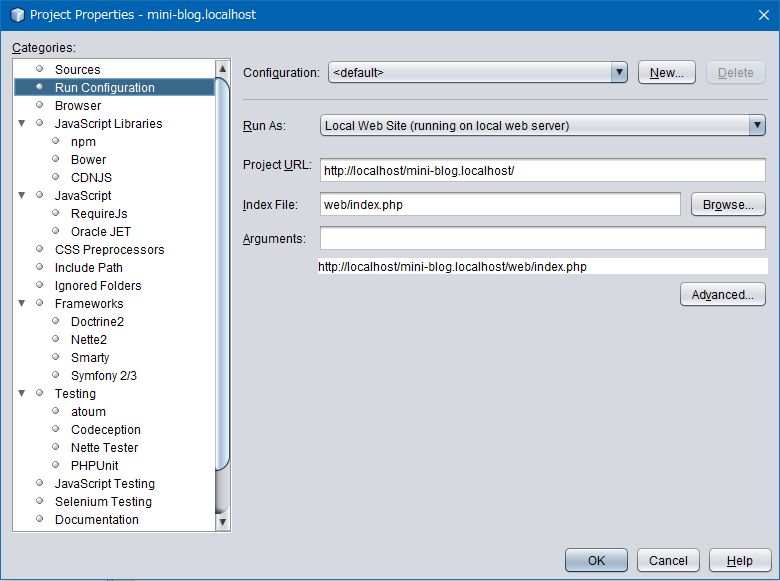
Project etc
| Sources Folder | C:\XAMPP\xampp_5.6.31\htdocs\mini-blog.localhost |
| Project URL | http://localhost/mini-blog.localhost/ |
| Index File | web/index.php |
New Menu [File] - [New Project...]
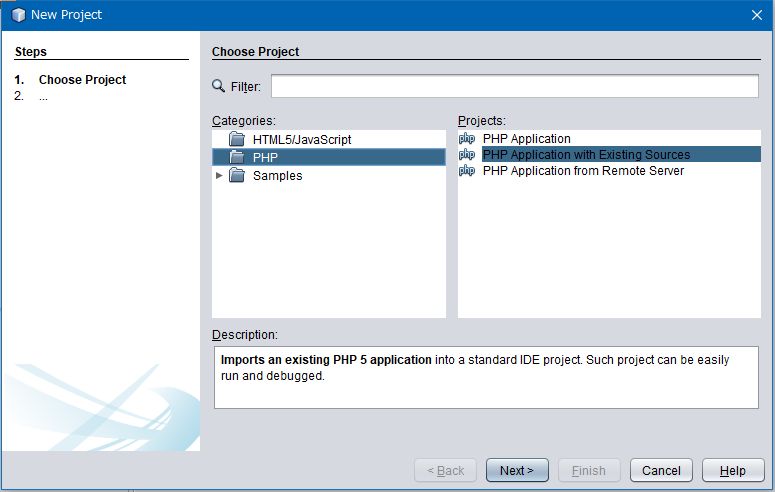
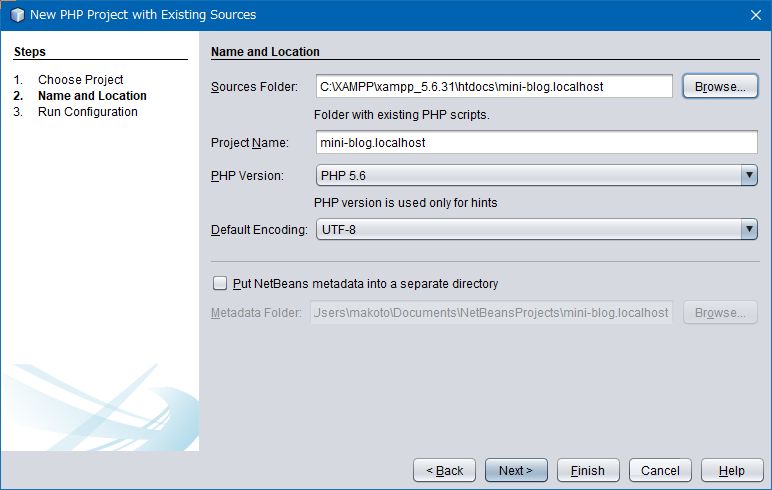
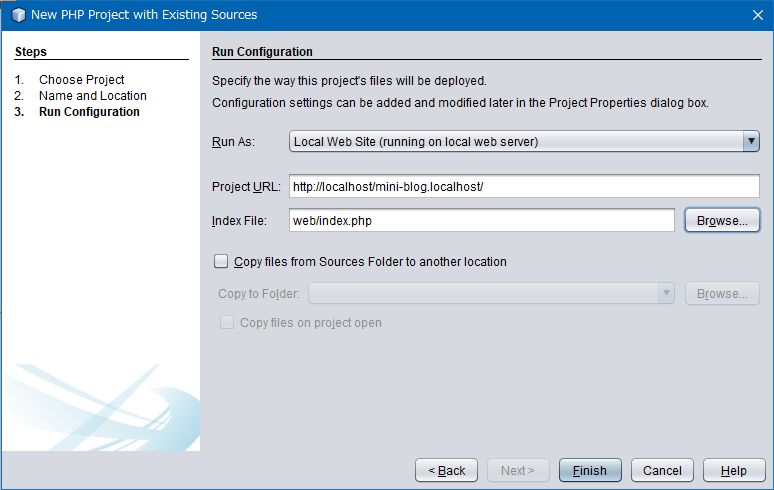
Modify Menu [Run] - [Set Project Configuration] - [Customize...]
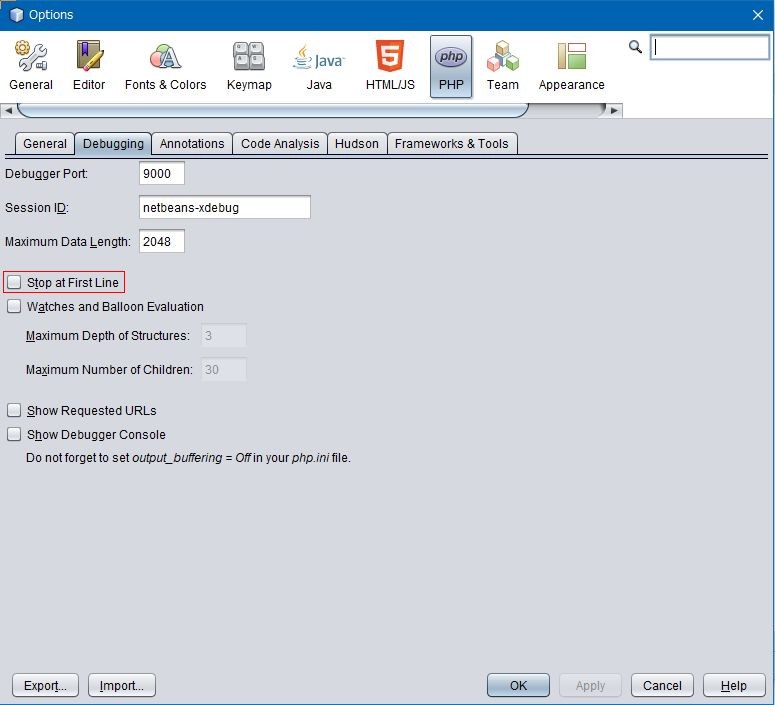
Menu [Tools] - [Options] [PHP] - [Debugging]
| Stop at First Line | OFF (default ON) |
Bug in XAMPP 7.1.14 and NetBeans IDE 8.2
Xdebug
XAMPP 7.x.x later, Xdebug is not installed or may be defective
php_xdebug.dll on the official site does not work properly
download from Installing Xdebug for XAMPP with PHP 7.x
|
XAMPP 7.1.14 (xampp-win32-7.1.14-0-VC14.zip) php_xdebug-2.5.5-7.1-vc14.dll C:\XAMPP\xampp_7.1.14\php\ext php_xdebug-2.5.5-7.1-vc14.dll → php_xdebug.dll (rename) |
This is a problem with XAMPP
It's not a problem with MAMP